Why SimplifyCAE
How you work with SimplifyCAE
Spend your time deciding, not chasing paperwork: fewer hours reviewing documentation, contractors who take care of their part, the peace of mind of knowing who can come in each day and everything ready if an inspection arrives. AI does the repetitive work; you have the final say.
Real SimplifyCAE images. The companies, people and documents shown are fictitious.
Document validation
Fewer hours validating documentation
AI prepares the work. You have the final say.
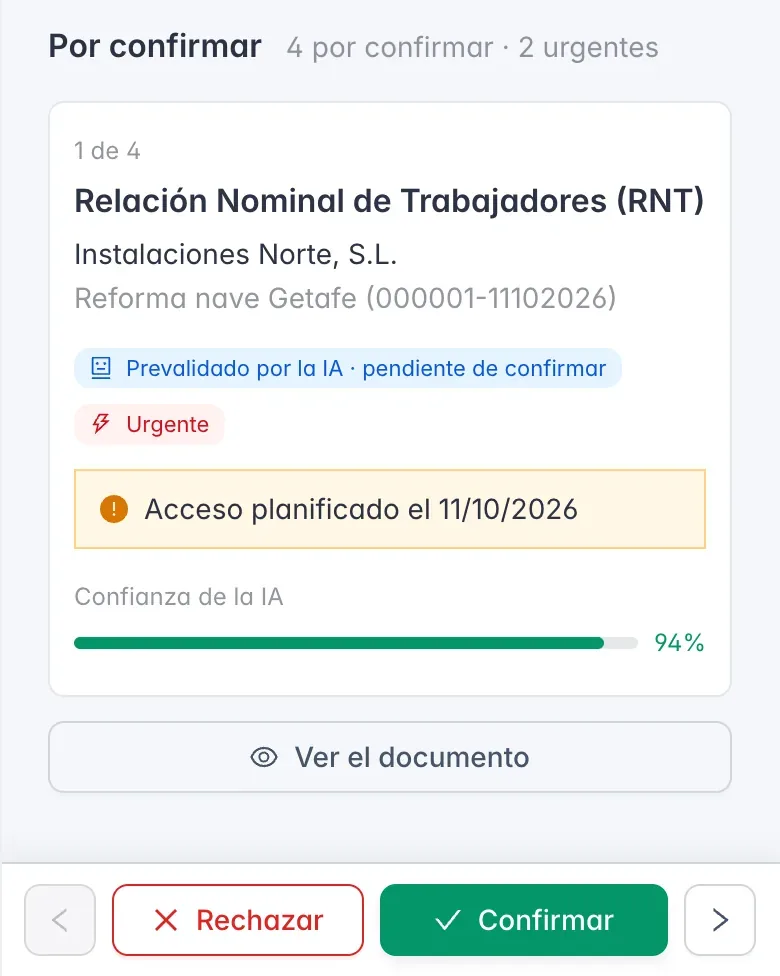
Stop opening PDFs one by one. Each document reaches you already read and pre-validated, with urgent items first, so your time goes into deciding, not searching.
- Confirm in one click what AI has already prepared, from your phone too
- Urgent items come first: you know what to review sooner
- Nothing is accredited without your confirmation, and it is recorded who confirmed each document
Contractor portal
Your contractors do their part (at no cost to them)
No more chasing anyone by email.
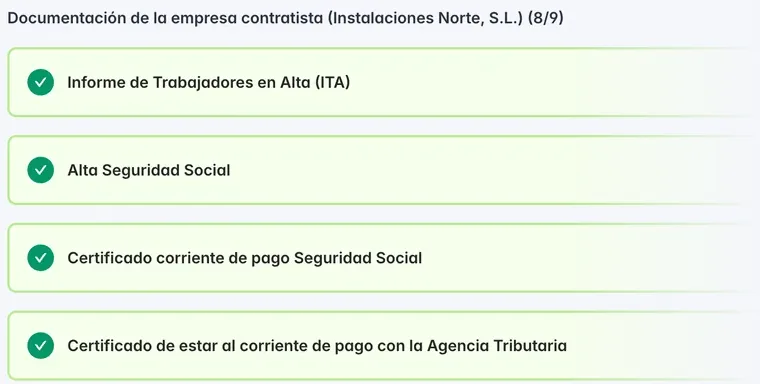
Each contractor logs in with their own free access and takes care of their documentation and that of their workers. SimplifyCAE reminds them.
- Free for your contractors: your invitation is all they need
- Reminders go out on their own when something is about to expire or is missing
- Their subcontractors join the same project and you can see them
Access control
You know who can come in today
No surprises at the gate and no verbal exceptions.
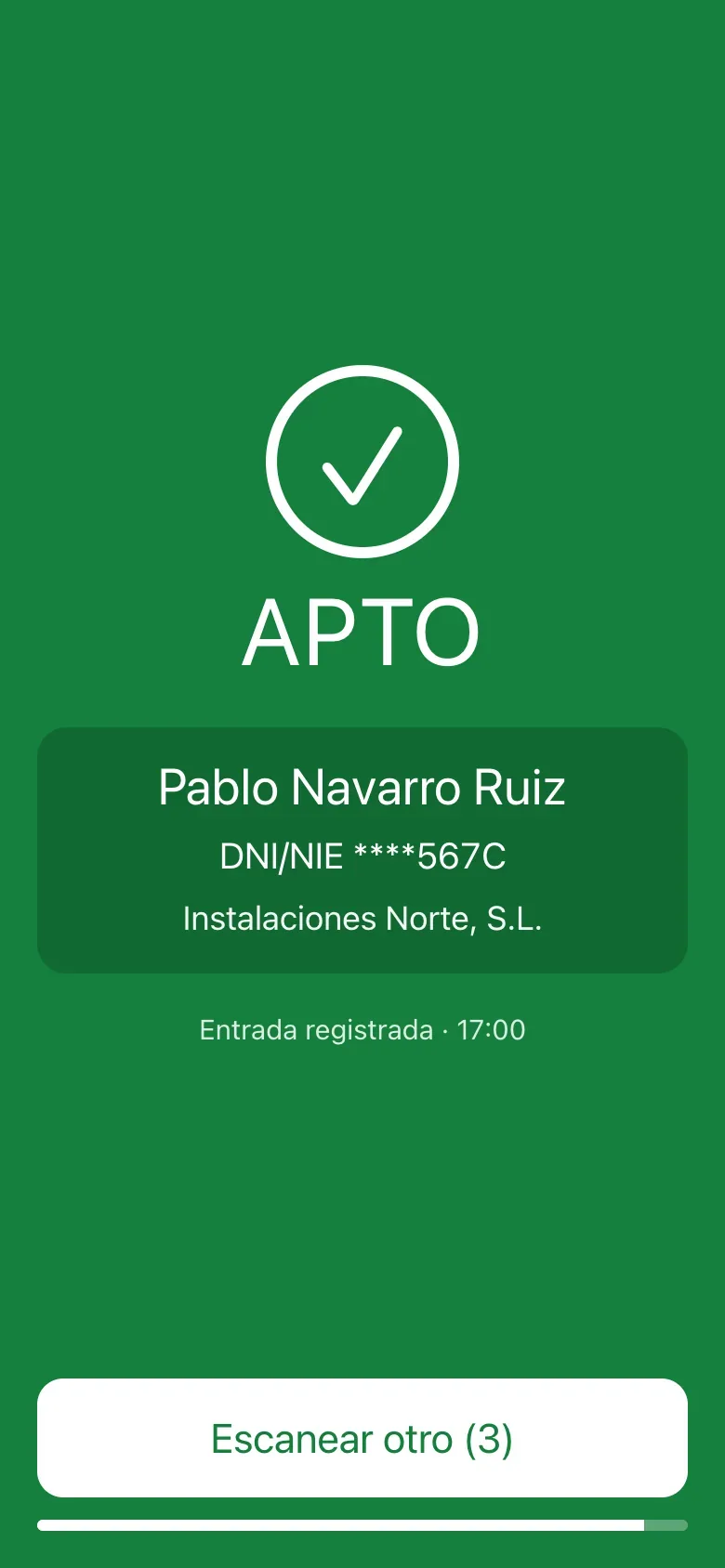
You cross the schedule with the documentation and see each day who can come in and who cannot, with the reason. And, if you want, a phone at the gate confirms it on the spot.
- Each worker’s status at a glance, before they arrive
- Urgent work doesn’t stop, and every exception has a person responsible and a reason
- Optional QR control at the gate: APTO (fit) or NO APTO (not fit) on the spot, with every entry recorded
Labour Inspectorate
Ready for an inspection
If a request arrives, you’re ready.
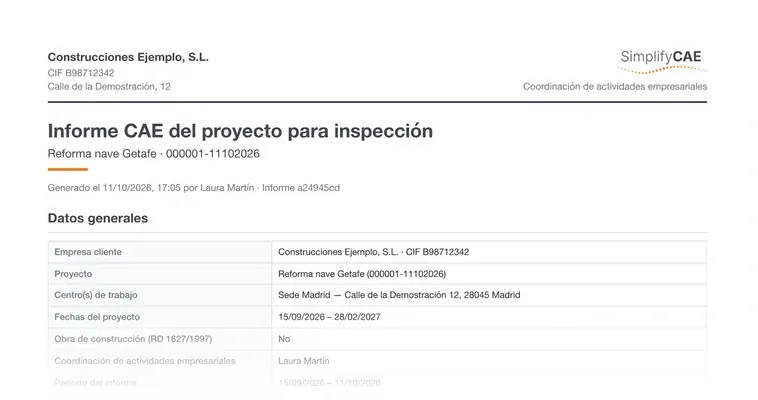
Everything that happens on the project is recorded. When the Labour Inspectorate asks for it, you generate the CAE report in a moment, without gathering folders.
- A complete project report, in PDF and ready to hand over
- It records who confirmed each document and when
- If the inspector wants to consult it, you give them temporary, secure access that you can revoke
Security
Your documentation, protected
You work with personal data and sensitive documentation. That is why SimplifyCAE encrypts it and each person sees only what concerns them.
- Documents and personal data encrypted with AES-256
- Encrypted connections
- Each user sees only what their role and work centres allow
- Audit log and GDPR by design
Frequently asked questions
What technicians usually ask before starting
- Do contractors pay anything?
- No. Contractors access the projects you invite them to for free. Only the coordinating company pays, and on every plan contractors, workers and users are unlimited.
- What exactly does the AI do? Can I trust it?
- AI does the reading: it recognises each document and leaves it pre-validated, or tells you why it needs review. But it never validates on its own: a document is only accredited when a technician confirms it, and that is recorded in the inspection report. Your documents are not used to train AI models.
- How long does it take to get started?
- You sign up yourself, with no sales call, and as soon as you create your first project you can invite your contractors. You get a 14-day trial with full access: a bank card is required, but nothing is charged during the trial and, unless you cancel before it ends, the chosen plan is charged afterwards.
- Where is my data and who can see it?
- Your documents and personal data are stored encrypted, and each user sees only what their role and work centres allow. Each contractor sees only their own data, and the Inspectorate only gets in if you give it access. Your data is yours: it is not shared with third parties except the processors needed to provide the service, and it is not used to train AI models.
- What happens if I cancel?
- There is no lock-in: you cancel whenever you want and the service remains available until the end of the paid period. After that, the account becomes read-only and you can export your information within the period set out in the general terms.
- Does it work for construction sites (Royal Decree 1627/1997)?
- Yes. When you create the project you indicate whether it is a construction site and SimplifyCAE adds the documentation specific to Royal Decree 1627/1997, such as the health and safety plan or the subcontracting book. The inspection report includes a section specific to the site.
- What happens if the Labour Inspectorate comes?
- You generate the project’s CAE report in PDF, with the documentation, who confirmed it and the coordination carried out. If the inspector wants to consult it directly, you give them temporary, secure, read-only access that you can revoke at any time.
- Can I use it with several work centres and projects?
- Yes. You can add several work centres and as many users as you need; the plan only limits active projects: 3 on Esencial, 15 on Profesional and 50 on Empresa. If you need more, you expand without changing plan or archive finished projects.
See it for yourself
Try SimplifyCAE for 14 days with your own projects and contractors. No lock-in.